README
Send any bug reports or issues to: GitHub Issues
Compatibility
MegaMod is not compatible with any other mods nor are they compatible with MegaMod.
MegaMod is completely independant from Core UQM, HD-Mod, HD-Remix, Crazy Mod, Balance Mod, Extended, or any other mods.
As such MegaMod has its own set of packages and add-ons.
For example the HD-Mod add-on package hires4x.zip is not compatible with MegaMod as MegaMod has its own HD package currently named mm-0.8.5-hd-content.uqm.
And as MegaMod is not compatible with any other mods, refrain from installing it over any existing UQM installations.
All current MegaMod compatible add-ons and content can be found on the main website's Releases page:
SourceForge
Content Installation
For these examples I will be using the HD content package but this works for any of the content packages. To start, download the HD content package on the Download page and make note of where you downloaded it.
Windows
You will only need to install content separately when not using the Windows installer
Copy the mm-0.8.5-hd-content.uqm file to your
addons directory. Which by default is
C:\Games\The Ur-Quan Masters MegaMod\content\addons\
After that you can load the MegaMod and opt to use the HD content in the setup menu within the graphics options.
macOS
Right click on the MegaMod app and select Show Package Contents
Navigate to Contents -> Resources -> content -> addons
Move or copy the mm-0.8.5-hd-content.uqm file into the addons folder.
After that you can load the MegaMod and opt to use the HD content in the setup menu within the graphics options.
GNU/Linux
To be honest I don't know of a decent, safe, and streamlined way to do this.
The Setup Menu
This is a rundown on all the options that aren't in Vanilla UQM.
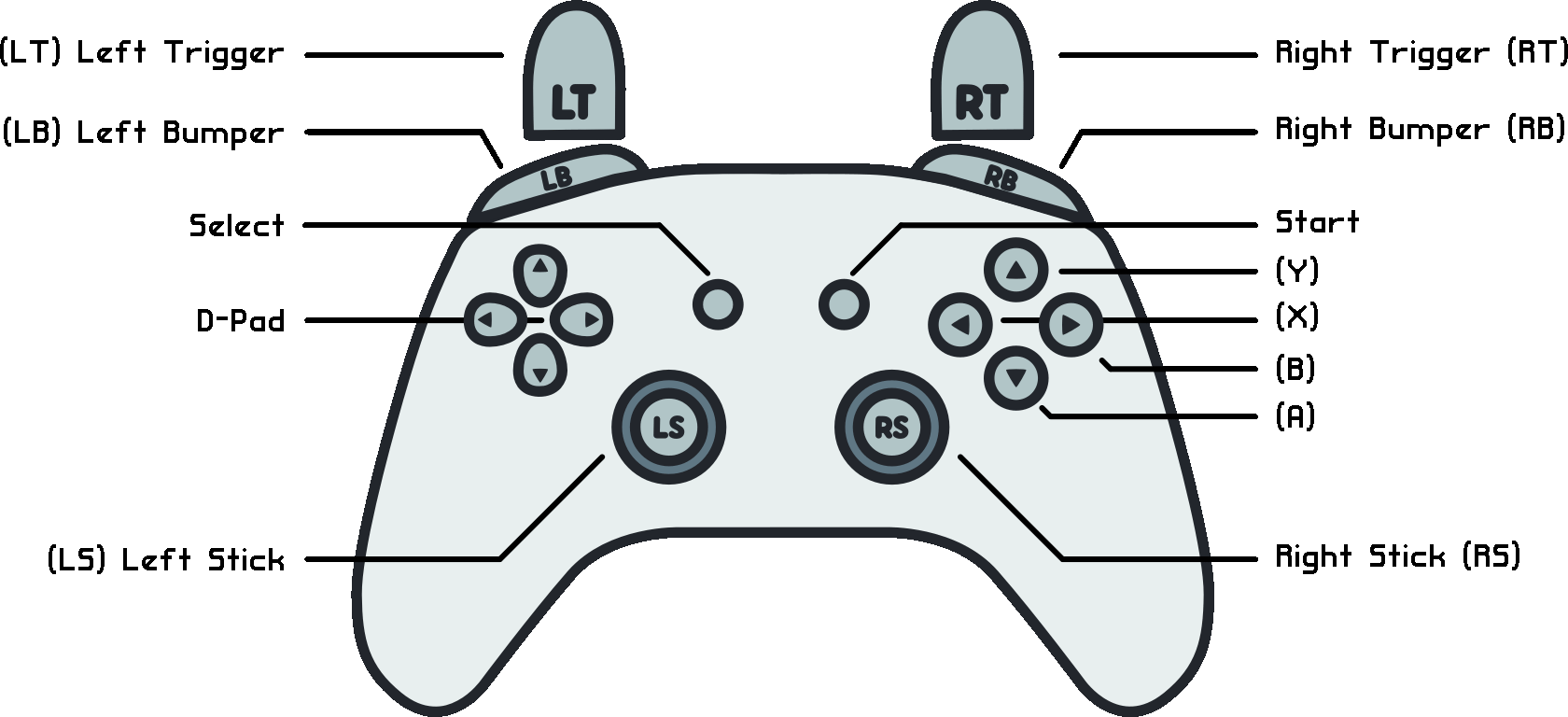
Default Gamepad Controls
While this shows more of an Xbox layout the PlayStation layout is the same.
In fact most controllers are supported unless they're not in the gamecontrollerdb.txt
(Which resides in the content directory inside the installation folder).
If you have a controller that doesn't seem to be working you can first try updating
the gamecontrollerdb.txt from the SDL_GameControllerDB GitHub page.
If that fails there are tools provided on that GitHub page which should allow
you to get the correct mapping for your controller and add it to the gamecontrollerdb.txt file.
| Menu Controls | ||
|---|---|---|
| Action | Button | Alternate |
| Up | D-Pad Up | LS Up |
| Down | D-Pad Down | LS Down |
| Left | D-Pad Left | LS Left |
| Right | D-Pad Right | LS Right |
| Select | A | |
| Cancel | B | |
| Special | X | |
| Pause | Start | |
| Exit | Select | |
| Shipyard Controls | ||
|---|---|---|
| Action | Button | Alt |
| Fill Crew x1 | D-Pad Up | LS Up |
| Remove Crew x1 | D-Pad Down | LS Down |
| Remove Crew x10 | D-Pad Left | LS Left |
| Fill Crew x10 | D-Pad Right | LS Right |
| Fill All Crew | RB | |
| Remove All Crew | LB | |
| Store/Retrieve Ship | LT | |
| Outfit Controls | ||
|---|---|---|
| Action | Button | Alt |
| Fill Fuel x1 | D-Pad Up | LS Up |
| Remove Fuel x1 | D-Pad Down | LS Down |
| Remove Fuel x10 | D-Pad Left | LS Left |
| Fill Fuel x10 | D-Pad Right | LS Right |
| Fill All Fuel | RB | |
| Remove All Fuel | LB | |
| StarMap Controls | |
|---|---|
| Action | Button |
| Zoom-In | RB |
| Zoom-Out | LB |
| Star Search | LB + RB |
| Search -> Next Star | LT |
| Increase Cursor Speed | Hold LT |
| Change Map | Y |
| Add/Remove Star Marker | X |
| Flight Controls | ||||
|---|---|---|---|---|
| Action | Button | Alt 1 | Alt 2 | Alt 3 |
| Thrust | D-Pad Up | LS Up | A | RT |
| Turn Left | D-Pad Left | LS Left | ||
| Turn Right | D-Pad Right | LS Right | ||
| Primary Weapon | X | RB | ||
| Secondary Weapon | B | LB | ||
| Emergency Escape | Y | |||
| Lander Controls | ||||
|---|---|---|---|---|
| Action | Alt 1 | Alt 2 | Alt 3 | Alt 4 |
| Thrust | D-Pad Up | LS Up | A | RT |
| Turn Left | D-Pad Left | LS Left | ||
| Turn Right | D-Pad Right | LS Right | ||
| Weapon | X | RB | ||
| Return to Ship | B | Y | LB | |
Changes
Contributors
Me (JHGuitarFreak), SlightlyIntelligentMonkey, Volasaurus, Ala-lala, Kruzenshtern, Taleden, Jordan Lo, Tarponpet, and King Duncan.
The main menu music for the MegaMod is brought to you by...
- Saibuster A.K.A. Itamar.Levy: https://s3.amazonaws.com/starcontrol/files/fan/music/Various/saibuster-hyprespace.mp3
- Mark Vera A.K.A. Jouni Airaksinen: https://www.youtube.com/watch?v=rsSc7x-p4zw
- Rush AX: https://s3.amazonaws.com/starcontrol/files/fan/music/Rush/HSpace%20Rush%20MIX.mp3
And the default Super Melee menu music is by Flashira Nakirov.
Licenses
The content for this project is licensed under Creative Commons Attribution-NonCommercial-ShareAlike 2.5 unless otherwise stated by a license file inside a package or add-on.
The source code for this project is licensed under the GNU General Public License v2.

